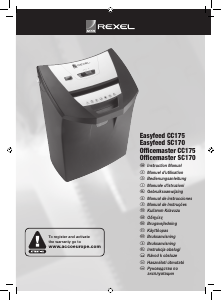
Használati útmutató Rexel Officemaster SC170 Iratmegsemmisítő

Kézikönyvre van szüksége a Rexel Officemaster SC170 Iratmegsemmisítő hez? Az alábbiakban ingyenesen megtekintheti és letöltheti a PDF kézikönyvet angol nyelven. Ez a termék jelenleg 2 gyakran ismételt kérdéseket, 3 megjegyzést tartalmaz, és 1 szavazattal rendelkezik, a termék átlagos értékelése 100/100. Ha nem ezt a kézikönyvet szeretné, kérjük, lépjen kapcsolatba velünk.

Hibás a terméke, és a kézikönyv nem kínál megoldást? Látogassa meg a Repair Café szolgáltatást ingyenes javítási szolgáltatásokért.

Használati útmutató

Loading…
5
G
Service
Do not attempt to service or repair the unit yourself. If your shredder is
under warranty return it to the point of purchase for replacement or repair.
If your shredder is no longer under the point of purchase return period and
requiresreplacementorrepair,pleasecontactyoursupplierforfurther
assistance.
Bin Full
There is a see through window on the front of the basket. When the chips
reach the middle of this window it is time to jog the bin or empty the basket
(no. 5).
Bag Holder
Foryourconvenience,selfadhesivehookstoholdthebaginplaceare
included.Tomountsimplypullthebackingfromthehookandpressrmlyin
the locations illustrated (fig. E).
Safety Lock Feature
This shredder is equipped with a safety lock feature. Should you want to
disabletheshredder(safetylockon),turntheknobaquarterofaturn
anti-clockwise (until the circles are aligned) (fig. C). The safety lock light
willilluminate.Tore-activate,alignthetwocircles,pushthedialinand
turn clockwise until you reach the unlocked icon. The ready lamp will now
illuminate (fig. D).
Empty Waste Bin
Lift handle into upright position and empty basket (fig. A).
Thermal Cut-off Feature
This shredder is not intended for continuous operation. This unit features a
thermal cut-off device that automatically shuts off the shredder if run for an
extendedperiodoftime.Ifthisoccurs,simplyallowtheshreddertocool.
Clearing Jams
Ifapaperjamoccurs,switchtheunittothereversepositionuntilthepaper
is out of the throat. If a jam occurs with paper more than halfway through
thecuttersmomentarilyswitchintotheREVERSEpositionuntilabout12mm
to25mmofshreddedpaperreversesout.Tearofftwoorthreesheetsand
switchintotheFORWARDpositiontoclearthepaperjam.Insomecases,it
maybenecessarytoalternatebetweenFORWARDandREVERSEpositions
several times to help clear excess paper from the cutting area.
Warranty
Operationofthismachineisguaranteedfor2yearsforthemachineand5
yearsforthecuttinghead,fromdateofpurchase,subjecttonormaluse.
Withintheguaranteeperiod,ACCOBrandswillatitsowndiscretioneither
repair or replace the defective machine free of charge. Defects due to misuse
or use for inappropriate purposes are not covered under the guarantee. Proof
ofdateofpurchasewillberequired.Repairsoralterationsmadebypersons
not authorised by ACCO Brands will invalidate the guarantee. It is our aim to
ensurethatourproductsperformtothespecicationsstated.Thisguarantee
does not affect the legal rights which consumers have under applicable
national legislation governing the sale of goods.
Registerthisproductonlineatwww.accoeurope.com
Shred Credit Cards
Youcanshredmax.15creditcardsperday.Feedthecreditcardintothe
centreoftheshredderthroat,narrowedgerst(fig. F). Do not feed wide
edgerst(fig. G).
Forward and Reverse
Movingtheswitchtoeitherofthesepositionswillcausetheunittorunin
the corresponding direction.
Auto
Simply insert paper into the centre of the throat. Once your document has
activatedthetriggerswitch,theunitwillturnonautomatically.
Installation
Position the shredder onto the basket. Once the unit is correctly positioned
onthebasket,plugitintoastandardACoutlet(fig. A).
NOTE: The cross-cut models include safety interlocks. If the bin is not fully
pushedintothecabinet,theinterlockswillnotbeactivatedandtheunitwill
not operate.
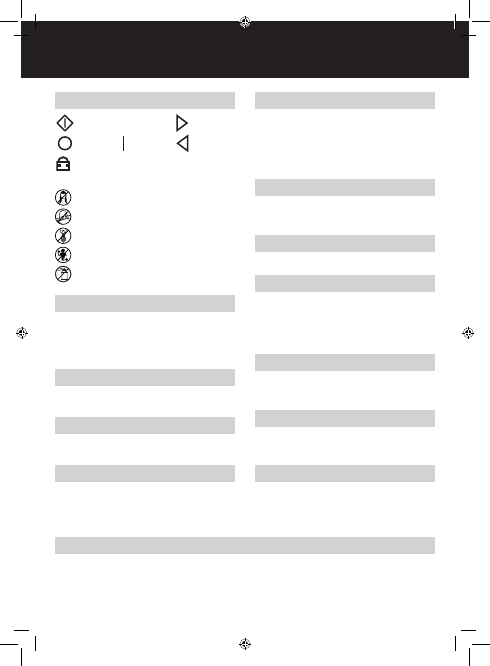
Shredder Control Panel
Whenilluminated,thismeansthemachineislocked.
Off
On
Reverse
Auto Forward
m
Safety First
This means you should be careful because long hair can become
entangled in the cutting head. This could hurt you.
This means don’t reach into the feed opening of the cutting head.
This could hurt you.
This means be careful of ties and other loose clothing which could
become entangled in the cutting head. This could hurt you.
This means keep children away from shredder.
This means do not use aerosol sprays anywhere near the unit.
Magyar nyelvű használati útmutató letöltése (PDF, 4.48 MB)
(Gondoljon a környezetre, és csak akkor nyomtassa ki a kézikönyvet, ha feltétlenül szükséges)

Loading…

Értékelés

Ossza meg velünk, mit gondol a Rexel Officemaster SC170 Iratmegsemmisítő: értékelje a terméket. Szeretné megosztani a termékkel kapcsolatos tapasztalatát, vagy kérdése van? Írja megjegyzését az oldal alján lévő szövegdobozba.
Elégedett a Rexel Officemaster SC170 Iratmegsemmisítő-szal?
Igen Nem
100%
0%
1 szavazás

Csatlakozzon a termékről folytatott párbeszédhez

Itt megoszthatja véleményét a Rexel Officemaster SC170 Iratmegsemmisítő-ról. Ha kérdése van, először figyelmesen olvassa el a kézikönyvet. Kézikönyv igénylése kapcsolatfelvételi űrlapunk segítségével történhet.

Iván 11-10-2021
Bekapcsolt helyzetben leállítja a munkát a papír behelyezése közben. Mi lehet az? Előre is köszönöm.

válasz | Hasznos volt (2) (A Google fordította)
Iván 11-10-2021
Hogyan kell kenni és milyen termékkel? Előre is köszönöm

válasz | Hasznos volt (0) (A Google fordította)
Iván 12-10-2021
Hogyan kell kenni és milyen termékkel? Előre is köszönöm

válasz | Hasznos volt (0) (A Google fordította)

További információ erről a kézikönyvről

Megértjük, hogy jó, ha van egy papíralapú kézikönyv a Rexel Officemaster SC170 Iratmegsemmisítő-hoz. A kézikönyvet bármikor letöltheti weboldalunkról, és saját maga is kinyomtathatja. Ha szeretne egy eredeti kézikönyvet, javasoljuk, hogy lépjen kapcsolatba a következővel: Rexel. Esetleg tudnak adni egy eredeti kézikönyvet. Más nyelvű kézikönyvet keres Rexel Officemaster SC170 Iratmegsemmisítő készülékéhez? Válassza ki a kívánt nyelvet a honlapunkon, és keresse meg a modellszámot, hátha elérhető.

Műszaki adatok

Márka Rexel
Modell Officemaster SC170
Kategória Iratmegsemmisítők
Fájltípus PDF
Fájl méret 4.48 MB

Rexel Iratmegsemmisítők összes kézikönyve
Iratmegsemmisítők további kézikönyvei

Gyakran Ismételt Kérdések a következővel kapcsolatban: Rexel Officemaster SC170 Iratmegsemmisítő

Ügyfélszolgálati csapatunk keresi a hasznos termékinformációkat, és válaszol a gyakran ismételt kérdésekre. Amennyiben pontatlanságot talál a gyakran ismételt kérdésekben, a kapcsolatfelvételi űrlapon jelezze nekünk a hibát.

Miért áll le a papíraprító egy bizonyos időszak után? Ellenőrzött

A papíraprítónak egy idő után le kell hűlnie, hogy megakadályozza a túlmelegedést. Az idő, ameddig a készülék működni tud, mielőtt lehűlne, különböző márkák és modellek szerint változik.

Hasznos volt (911) Olvass tovább

Milyen gyakran kell olajozni a papíraprítót? Ellenőrzött

Alkalmi használat esetén elegendő kéthavonta egyszer olajozni a papíraprítót. (Nagyon) rendszeres használat esetén észreveheti, hogy a gépnek nehézségei vannak az aprítással, vagy hogy a papír könnyen beragad. Ezek a gép olajozásának jelei.

Hasznos volt (569) Olvass tovább
Használati útmutató Rexel Officemaster SC170 Iratmegsemmisítő

Kapcsolódó termékek

Kapcsolódó kategóriák

×
Download