Használati útmutató Kensington K72342EU Pro Fit Egér

Kézikönyvre van szüksége a Kensington K72342EU Pro Fit Egér hez? Az alábbiakban ingyenesen megtekintheti és letöltheti a PDF kézikönyvet angol nyelven. Ez a termék jelenleg 4 gyakran ismételt kérdéseket, 0 megjegyzést tartalmaz, és 0 szavazattal rendelkezik. Ha nem ezt a kézikönyvet szeretné, kérjük, lépjen kapcsolatba velünk.

Hibás a terméke, és a kézikönyv nem kínál megoldást? Látogassa meg a Repair Café szolgáltatást ingyenes javítási szolgáltatásokért.

Használati útmutató

Loading…
4
5
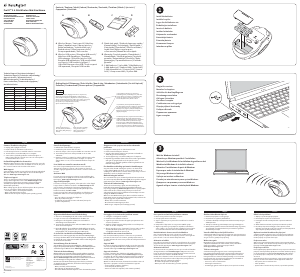
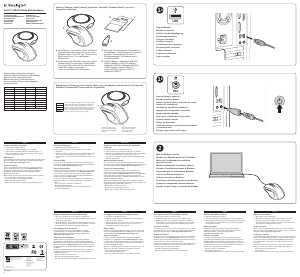
b. Re-establishing a Wireless Connection:
If the connection between your mouse and receiver is broken (mouse is in proper
working order working with good batteries, and the receiver is installed properly,
yet it is not working), you may need to re-establish a wireless connection.
c. To Re-establish a Wireless Connection:
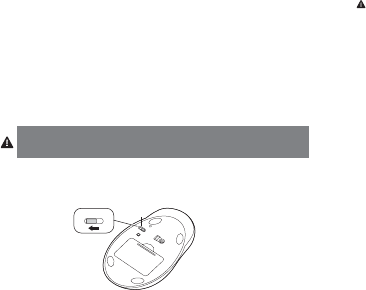
With the USB receiver in position and mouse turned on, press the “connect” button on
the receiver (1), and within 30 seconds, also press the connect” button on the bottom
of the mouse (2). You have now established a new connection for the mouse.
If this does not work, try repeating these steps while holding the mouse close to the
receiver. This step may need to be repeated 2–3 times for the mouse to synchronize.
If necessary, repeat this procedure after replacing depleted batteries.
IMPORTANT: This wireless device is similar to an FM radio, the position of your
computer and surrounding objects (especially metal objects) may effect your wireless
reception and range (average range is approximately 10 meters or 30 feet).
Optional Battery Saving Feature
To preserve battery life when not using the mouse for long periods of time, slide the switch
(3) to OFF.
Registering Your Kensington Product
Register your Kensington product online at www.kensington.com.
Common Troubleshooting Steps
1. Unplug and re-plug the receiver. Repeat steps 2b to 2c to re-establish a wireless
connection.
2. Install a fresh set of batteries in the mouse.
3. Test the device on another USB port or computer.
4. Some surfaces may “trick” the optical sensor, such as reflective surfaces like glass or
mirrors. The optical sensor should perform well on all other surfaces.
5. To establish a wireless connection, see steps 2a to 2c.
6. To save battery power, turn off the mouse when not in use. See Optional Battery
Saving Feature.
Health Warning
Use of a keyboard, mouse, or trackball may be linked to serious injuries or disorders. Recent
medical research of occupational Injuries has linked normal, seemingly harmless activities
as a potential cause of Repetitive Stress Injuries (“RSI”). Many factors may be linked to the
occurrence of RSl, including a persons own medical and physical condition, overall health, and
how a person positions and uses his or her body during work and other activities (including
use of a keyboard or mouse). Some studies suggest that the amount of time a person uses a
keyboard, mouse, or trackball may also be a factor. Consult a qualified health professional for
any questions or concerns you may have about these risk factors.
When using a keyboard, mouse, or trackball, you may experience occasional discomfort in
your hands, arms, shoulders, neck, or other parts of your body. However, if you experience
symptoms such as persistent or recurring discomfort, pain, throbbing, aching, tingling,
numbness, burning sensation, or stiffness, even if such symptoms occur while you are not
working at your computer. DO NOT IGNORE THESE WARNING SIGNS. PROMPTLY SEE A
QUALIFIED HEALTH PROFESSIONAL. These symptoms can be signs of sometimes permanently
disabling RSI disorders of the nerves, muscles, tendons, or other parts of the body, such as
carpal tunnel syndrome, tendonitis, tenosynovitis, and other conditions.
Technical Support
Technical support is available to all registered users of Kensington products. Technical
Support contact information can be found on the back page of this manual.
Web Support
You may find the answer to your problem in the Frequently Asked Questions (FAQ)
section of the Support area on the Kensington Website: www.support.kensington.com.
Telephone Support
There is no charge for technical support except long-distance charges where applicable.
Please visit www.kensington.com for telephone support hours. In Europe, technical support is
available by telephone Monday to Friday 09:00 to 21:00 (Central European time).
Please note the following when calling support:
• Callfromaphonewhereyouhaveaccesstoyourdevice.
• Bepreparedtoprovidethefollowinginformation:
Name, address, and telephone number
Name of the Kensington product
Make and model of your computer
System software and version
Symptoms of the problem and what led to them
FEDERAL COMMUNICATIONS COMMISSION RADIO FREQUENCY INTERFERENCE STATEMENT
This device has been tested and found to comply with the limits for a Class B digital device, pursuant to Part 15 of the FCC
Rules. These limits are designed to provide reasonable protection against harmful interference in a residential installation.
This equipment generates, uses. and can radiate radio frequency energy and, if not installed and used in accordance with
the instructions, may cause harmful interference to radio communications.
However, there is no guarantee that interference will not occur in a particular installation. If this equipment causes
harmful interference to radio or television reception, which can be determined by turning the equipment off and on, the
user is encouraged to try to correct the interference by one or more of the following measures:
• Reorientorrelocatethereceivingantenna.
Magyar nyelvű használati útmutató letöltése (PDF, 4.04 MB)
(Gondoljon a környezetre, és csak akkor nyomtassa ki a kézikönyvet, ha feltétlenül szükséges)

Loading…

Értékelés

Ossza meg velünk, mit gondol a Kensington K72342EU Pro Fit Egér: értékelje a terméket. Szeretné megosztani a termékkel kapcsolatos tapasztalatát, vagy kérdése van? Írja megjegyzését az oldal alján lévő szövegdobozba.
Elégedett a Kensington K72342EU Pro Fit Egér-szal?
Igen Nem
Értékelje elsőként a terméket
0 szavazás

Csatlakozzon a termékről folytatott párbeszédhez

Itt megoszthatja véleményét a Kensington K72342EU Pro Fit Egér-ról. Ha kérdése van, először figyelmesen olvassa el a kézikönyvet. Kézikönyv igénylése kapcsolatfelvételi űrlapunk segítségével történhet.

További információ erről a kézikönyvről

Megértjük, hogy jó, ha van egy papíralapú kézikönyv a Kensington K72342EU Pro Fit Egér-hoz. A kézikönyvet bármikor letöltheti weboldalunkról, és saját maga is kinyomtathatja. Ha szeretne egy eredeti kézikönyvet, javasoljuk, hogy lépjen kapcsolatba a következővel: Kensington. Esetleg tudnak adni egy eredeti kézikönyvet. Más nyelvű kézikönyvet keres Kensington K72342EU Pro Fit Egér készülékéhez? Válassza ki a kívánt nyelvet a honlapunkon, és keresse meg a modellszámot, hátha elérhető.

Műszaki adatok

Márka Kensington
Modell K72342EU Pro Fit
Kategória Egerek
Fájltípus PDF
Fájl méret 4.04 MB

Kensington Egerek összes kézikönyve
Egerek további kézikönyvei

Gyakran Ismételt Kérdések a következővel kapcsolatban: Kensington K72342EU Pro Fit Egér

Ügyfélszolgálati csapatunk keresi a hasznos termékinformációkat, és válaszol a gyakran ismételt kérdésekre. Amennyiben pontatlanságot talál a gyakran ismételt kérdésekben, a kapcsolatfelvételi űrlapon jelezze nekünk a hibát.

Milyen felület a legalkalmasabb az egér használatához? Ellenőrzött

A hagyományos görgős egér párnázott felületen, például egérpadon működik a legjobban.Az optikai egér az átlátszó vagy tükröződő felületek kivételével majdnem minden sík felületen működik.A nyomtatott, ismétlődő mintával rendelkező felületek befolyásolhatják az egér működését.

Hasznos volt (127) Olvass tovább

Mi az ergonómikus egér? Ellenőrzött

A rendszeres egér napi használata hosszú ideig fájdalmat okozhat a karban és a csuklóban. Ezt RSI-nek (Repetitive Strain Injury) is nevezik. Az ergonomikus egér úgy van kialakítva, hogy ezeket a problémákat csökkentse vagy megelőzze.

Hasznos volt (59) Olvass tovább

Mi a különbség a normál egér és a játék egér között? Ellenőrzött

Minden játékegér normál egérként használható. A játékegérnek azonban gyakran vannak további gombjai bizonyos helyeken, hogy megkönnyítsék a játékot. Vannak még olyan játék egerek is, amelyeknek vannak gombjai, amelyek célja egy adott játék jobb lejátszása.

Hasznos volt (58) Olvass tovább

Milyen méretű egér a legjobb a kezemhez? Ellenőrzött

Ez részben a személyes preferenciáktól és szükségszerűségektől függ, de általában az egérnek a kéz méretének körülbelül 60% -ának kell lennie. Ez a legkényelmesebb és leginkább ergononikus.

Hasznos volt (53) Olvass tovább
Használati útmutató Kensington K72342EU Pro Fit Egér

Kapcsolódó termékek

Kapcsolódó kategóriák

×
Download